|
|
|
|
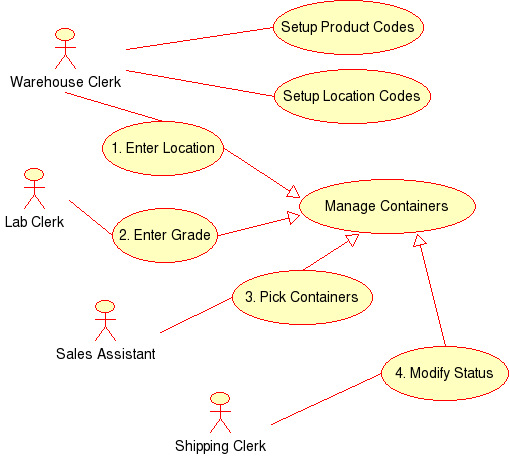
Inventory Design The design and subsequent MonoDevelop application are based on an actual application. However, this implementation has been kept simple. Use Case The Use Case diagram shows that the application will be used by several people.
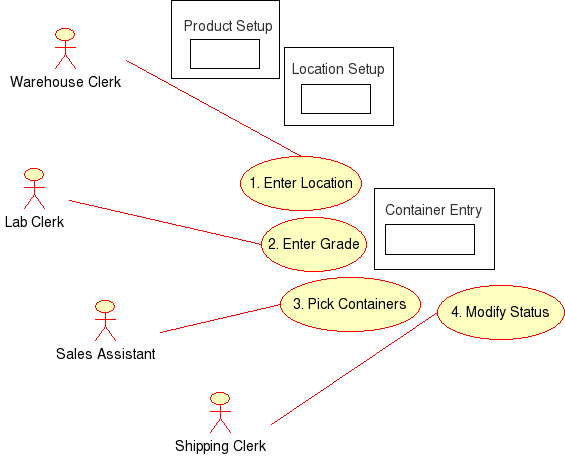
Use Case with Screens Diagram This Use Case diagram shows the application screens and the various system users .
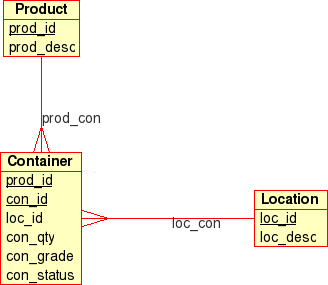
Entity Relationship Diagram The Entity Relationship diagram shows the application has a simple data base. The container table has (1) the loc_id field for Enter Location, (2) the con_grade field for Enter Grade, and (3) the con_status field for the Pick Containers ( status changes from Available to Picked ) and for Modify Status ( status changes from Picked to Shipped ).
The Inventory Database The database tables are defined as shown below. I use phpMyAdmin ( a website based administrator for MySQL ) or MySQLCC the "Control Center" application. Either way, use these tools to load the database and make sure to add a user for the appropriate IP address. (All of my examples, use the "root" user.)
ODBC Database Connection The MySQL software includes a 3.51 ODBC driver that can be installed from the Linux system or from the MySQL website. My Linux system, uses the unixODBC software for the ODBC connection. Two files must be configured in the /etc/UnixODBC directory: "odbcinst.ini" and "odbc.ini". The file odbcinst.ini file configures the system for the ODBC driver. The odbc.ini file configures the system for the "inventory" database instance. odbcinst.ini [mysql_driver] odbc.ini [inv]
|
|
|